
Devices
Concept that describes a data acquisition element, that is, an element capable of taking samples of information from an environment where a physical phenomenon under study occurs, and from which a set of analog signals is to be obtained in order to condition, digitize and transmit them for further processing to a higher-level entity, in our case the SCADA system.
Equipment of this nature includes PLCs, RTUs, smart meters or sensors for physical quantities, and any other field element or device that collects information from a physical process and has communication capabilities.
The connection to the system is made using one or more communication Channels and the device will be polled periodically based on certain guidelines defined in the Scan Groups.
Screenshot
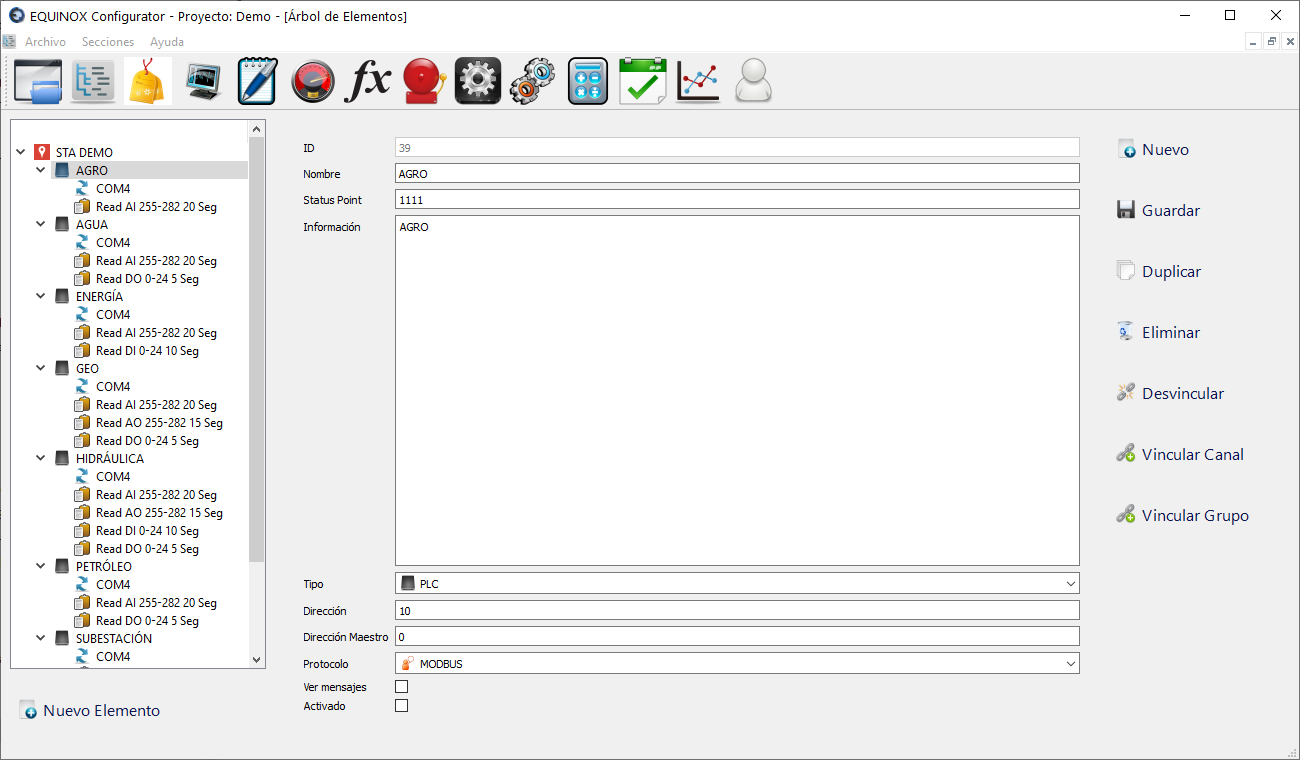
Definition
- Select another Device from the list and click the New button in the upper right area of the window
- If no Device has been defined yet, click New Element, select Device from the list and click Ok
- Fill in the following fields
Field Description Name Name of the device Status Point Id of the point used to reflect the device’s status (in service, out of service, etc). Optional; enter 0 if not used Information Text for user reference, not used by the system Type Device type, for user reference. Choose RTU, PLC, IED, etc Address Device hardware address Master Address DNP master hardware address. For MODBUS enter 0 Protocol MODBUS or DNP (check which protocols are enabled in your license) View messages Check if you want data exchanges related to this Device to be shown in the Core module Enabled Check if you want this Device to be taken into account by the Core Module - Click Save
Other buttons
| Button | Description |
|---|---|
| Duplicate | Creates a new Device with the same settings |
| Delete | Deletes the Device |
| Unlink | Allows unlinking the Device from the Station it is linked to |
| Link Channel | Allows linking Communication Channels to this Device. A small window will open to select the channel. |
| Link Group | Allows linking Scan Groups to this Device. A small window will open to select the group. |