
Alarm Groups
Alarm groups bring together certain points that have been assigned to them. A state change in those points generates an alarm with the characteristics of the group it belongs to.
Each group has a certain priority; in the lists, alarms with higher priority are always shown first. Alarms of a certain group will have a specific text color, background color, and sound, which can be set to loop.
It is also possible to display a pop-up window with a specific message. In addition, it is possible to define a list of Users who will be alerted by email when alarms of a certain group occur.
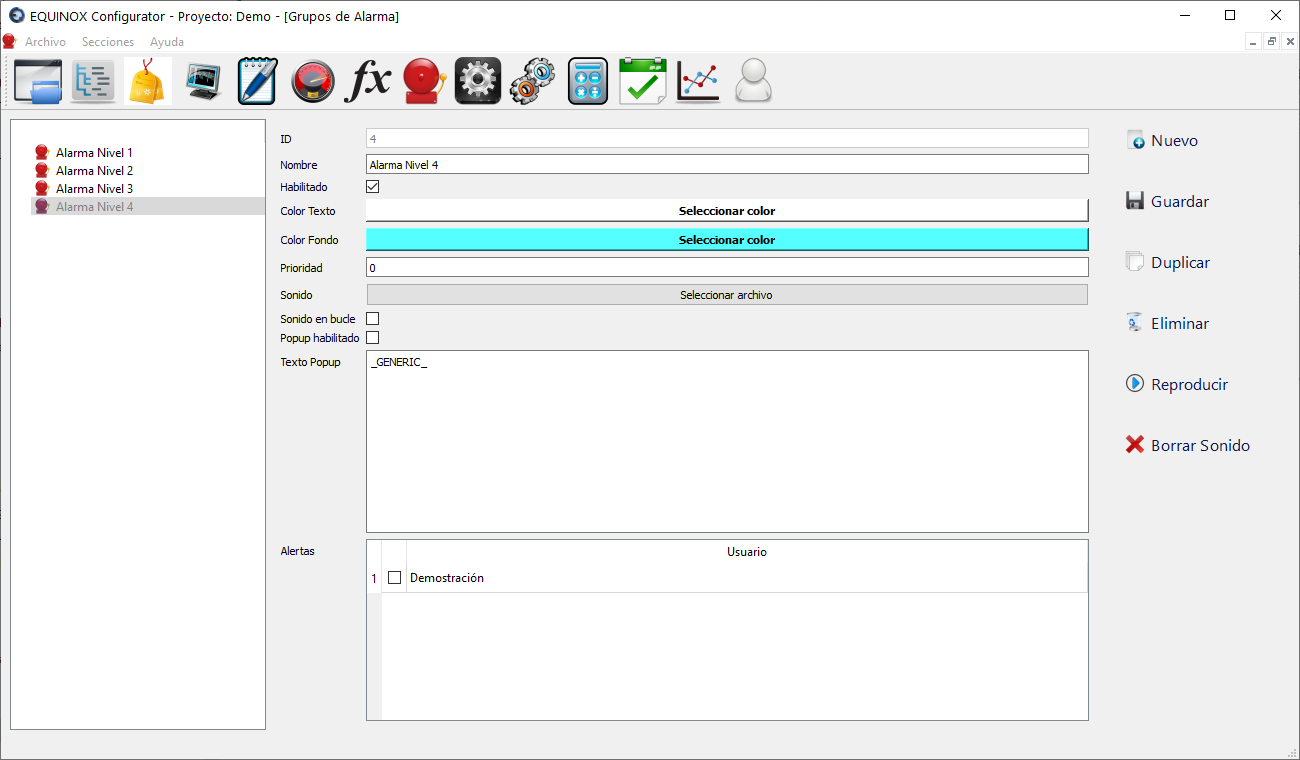
Screenshot
Definition
- Click New in the upper right area of the window
- Fill in the following fields
Field Description Name Name of the Group. It will be shown under this name in the corresponding column of the Points section Enabled Check to enable alarm generation for this group Text color Text color used to display alarms of this group in the lists Background color Text background color used to display alarms of this group in the lists Priority Numeric value that determines the priority of this group’s alarms relative to other groups. The lower the value, the higher the priority Sound Allows selecting an audio file to be played when an alarm of this group is generated Loop sound Check so that the above sound is played in a loop Popup enabled Check to display a pop-up window with a specific message when alarms of the group occur Popup text Text to be displayed in the pop-up window when alarms of this group occur, if the previous field has been checked Alerts Check the users who should receive an email when alarms of this group occur (depending on license) - Click Save
- From now on the Group will be available to be assigned in the Points section