
Complex Commands
Sequential commands are used when it is necessary to send a sequence of several simple commands that together carry out a complex action on the Device.
Screenshot
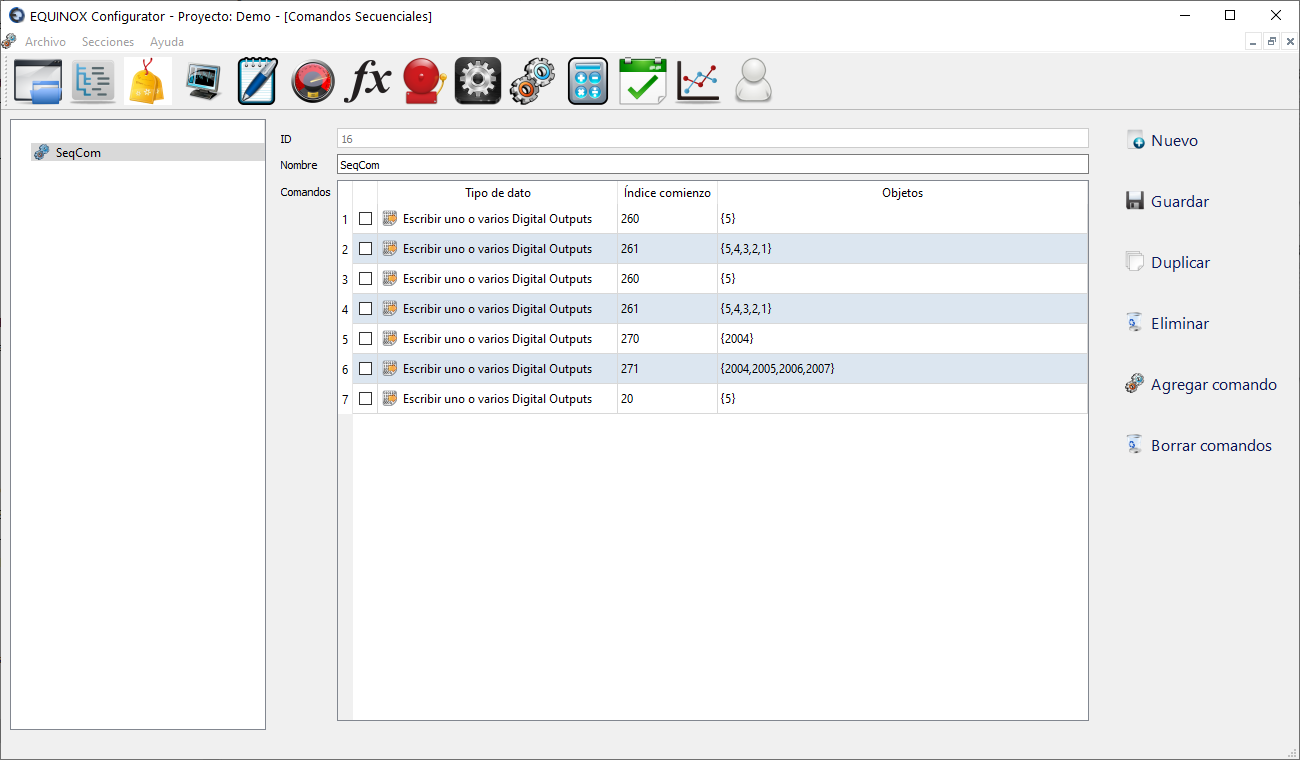
Definition
- Click New in the upper right area of the window
- Assign a name to the Sequential Command using the Name field. It will be shown under this name in the Command Set section
- Click Save
- Select the Sequential Command you just created from the list
- Click “Add Command” as many times as there are steps in the command sequence you want to create
- For each row of the table:
- In Data Type select one of the following operations:
Data Type Description Write one or several Digital Outputs Sets one or several Coils using Modbus Function Code 5 (Force Single Coil); a telecommand is issued for each Coil Write one or several Register Outputs Sets one or several Holding Registers using Modbus Function Code 6 (Preset Single Register); a telecommand is issued for each Holding Register Write multiple Digital Outputs Sets several Coils using Modbus Function Code 15 (Force Multiple Coils); a single telecommand is issued for all the Coils Write multiple Register Outputs Sets several Holding Registers using Modbus Function Code 16 (Preset Multiple Registers); a single telecommand is issued for all the Holding Registers - In Start Index enter the address of the first Coil or Register; the action will be performed starting from that address for a certain number of consecutive Coils/Registers, equal to the number of items in the Objects field
- In Objects specify a comma-separated list of items as described below
- In Data Type select one of the following operations:
Objects
Each item in the Objects field represents a telecommand to be performed on a Coil or Register with a certain address; that address will be the Start Index plus an offset equal to the item’s position within Objects.
The content of each item has the following structure: source_value:operation_on_value
source_value field
The following prefixes can be used for the source value
| Prefix | Description |
|---|---|
| b | Binary value |
| ro | Register Output value |
| ri | Register Input value |
| pn | Point value |
Examples:
| Value | Description |
|---|---|
| 1234 | Fixed value in decimal format |
| b1010000001001001 | Fixed value in binary format (41033 decimal) |
| ri120 | Value taken from Register Input at address 120 |
| ro90 | Value taken from Register Output at address 90 |
| pn1233 | Value taken from the point with Id 1233 |
operation_on_value field
This field is optional; if omitted, do not enter a “:” after source_value.
Allows altering the bits of source_value using the b prefix, which can use 1, 0, or #. The pound sign (#) preserves the bit’s value, while using 1 or 0 replaces that particular bit.
Example
The following Complex Command is defined, containing a single command; additional commands could be added to the table to be executed sequentially after this one
| Data Type | Start Index | Objects |
|---|---|---|
| Write multiple Register Outputs | 9132 | ri20:b##############0#, ro11:b############1###, pn1233:b############1#1#, b0000000000000110, 1234, pn22345, ri234, ro111 |
Below is a description of each Item in the Objects field:
| Objects item | Description |
|---|---|
| ri20:b##############0# | ✓️ Source value ri20: reads the value of Register Input at address 20 ✓️ Operation b##############0#: keeps all bits and writes a 0 to bit 1 ✓️ Writes the result to Reg. Output no. 9132 (Start Index) |
| ro11:b############1### | ✓️ Source value ro11: reads the value of Register Output at address 11 ✓️ Operation b############1###: keeps all bits and writes a 1 to bit 3 ✓️ Writes the result to Reg. Output no. 9133 (Start Index + 1) |
| pn1233:b############1#1# | ✓️ Source value pn1233: reads the value of Point no. 1233 ✓️ Operation b############1#1#: keeps all bits and writes a 1 to bits 1 and 3 ✓️ Writes the result to Reg. Output no. 9134 (Start Index + 2) |
| b0000000000000110 | Writes the value 6 to Register Output no. 9135 (Start Index + 3) |
| 1234 | Writes value 1234 to Register Output no. 9136 (Start Index + 4) |
| pn22345 | Writes the value of the Point with Id 22345 to Register Output at address 9137 (Start Index + 5) |
| ri234 | Writes the value of Register Input at address 234 to Register Output no. 9138 (Start Index + 6) |
| ro111 | Writes the value of Register Output at address 111 to Register Output no. 9139 (Start Index + 7) |