
Display design
The graphic displays used by EQUINOX are based on Scalable Vector Graphics, or SVG.
SVG is an open Internet standard supported by all of today’s most popular browsers. Graphics in this format can be resized without losing quality, and these files are also smaller than bitmap images, so they do not require a large amount of bandwidth to be sent over data networks.
The content of SVG files is plain text in XML (eXtensible Markup Language) format, a markup language used to store data in a human-readable form, developed - like the SVG specification itself - by the W3C (World Wide Web Consortium).
Displays designed for EQUINOX take advantage of these characteristics; the files also contain certain definitions that let the system identify specific graphic symbols within them, representing sections or elements of the process under supervision, with the goal of manipulating them and changing their graphic appearance in line with changes in status and indication of the system points associated with them.
Inkscape
Inkscape is used as the display editing software, a free, cross-platform SVG vector graphics editor. It is distributed under the GNU General Public License. A copy of the program is included and installed together with EQUINOX.
Inkscape has a set of tools common to graphic design software, so it will feel familiar to users who have experience with similar graphic editing programs such as Adobe Illustrator. Various tutorials on its use can be found on the Internet, or you can also consult the official documentation
System symbols
In SCADA systems, a symbol is a grouping of graphic elements intended to pictorially represent a given element, variable, parameter, or real-world quantity.
A symbol can represent a valve, a switch, the level of a tank, the reading of a thermometer, the operating state of a piece of equipment or machinery, the pressure inside an enclosure, among many other possibilities. They can be dynamically altered or modified according to the current condition of the element they represent. In addition, in the event of a loss of communication with the associated Device (from which this information is obtained), this is signaled appropriately.
Symbols are inserted within a SCADA display; the set of symbols represents a given process or situation of interest to the system user. SVG vector graphics are used for the creation and editing of symbols, just as with SCADA displays.
Symbol types
There are five types of symbols: Status, Bar, Gauge, Measure, and Static
| Symbol type | Description |
|---|---|
| Status | Symbols for digital points; different graphics are shown according to the current state of the point |
| Bar | Symbols for analog registers that represent their value on screen by means of a bar whose height is proportional to the register’s value |
| Gauge | Symbols for analog registers that represent their value on screen by means of a needle-type gauge whose position corresponds to the register’s value |
| Measure | Symbols for analog registers that show the register’s numeric value on screen |
| Static | Static symbols that do not change appearance but can be associated with actions: links to other Displays or execution of command sets |
Access a complete example of creating a graphic display.
Status symbol example
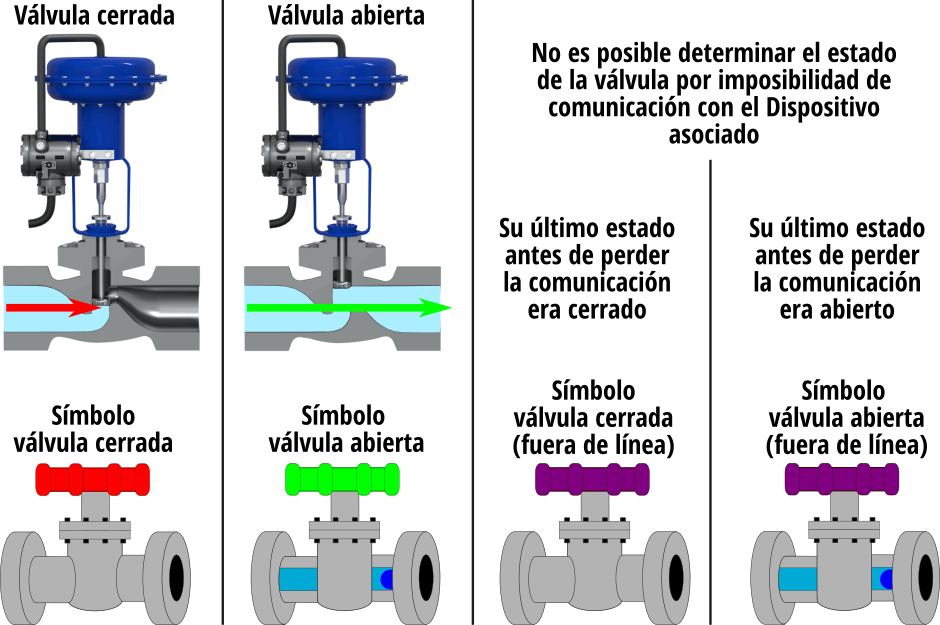
Suppose our SCADA project contains a Device that is in turn connected to a valve with a pneumatic actuator that lets its position be determined: valve open or closed. EQUINOX will periodically poll the Device about the valve’s position, and depending on the response, will show the graphic of an open or closed valve on screen. If communication with this Device is lost, whether due to problems with the Channel or with the Device itself, this situation will be signaled on screen, showing the last known state of the valve but indicating the loss of communication:
Characteristics common to all symbol types
The system’s symbols are groups (<g> element) containing simple graphic elements such as text, lines, rectangles, circles, paths, and various shapes.
The groups corresponding to symbols have a special attribute, meant to be interpreted only by the system, called eq-symbol. This attribute holds as its value a JSON string {“type”:“value”} with the possible values bar, gauge, status, static, or measure.
Within this main group representing the symbol, one or more groups with different functions are inserted, except in the case of measure-type symbols, which contain a <text> element instead. These elements (<g> or <text>) have a special attribute, meant to be interpreted only by the system, called eq-data. This attribute holds as its value a JSON string with one or more key:value pairs representing various pieces of information related to this element.